AroGuard – Food Ingredient Decoder & Diet Planner
Duration: Nov 2025 – Dec 2025
Technologies: React, TypeScript, Groq AI, Perplexity AI, Tailwind CSS, Recharts, shadcn/ui, jsPDF, IndexedDB, Open Food Facts API
Category: Web Development, AI Integration, Health Tech, Nutrition Tracking
Description
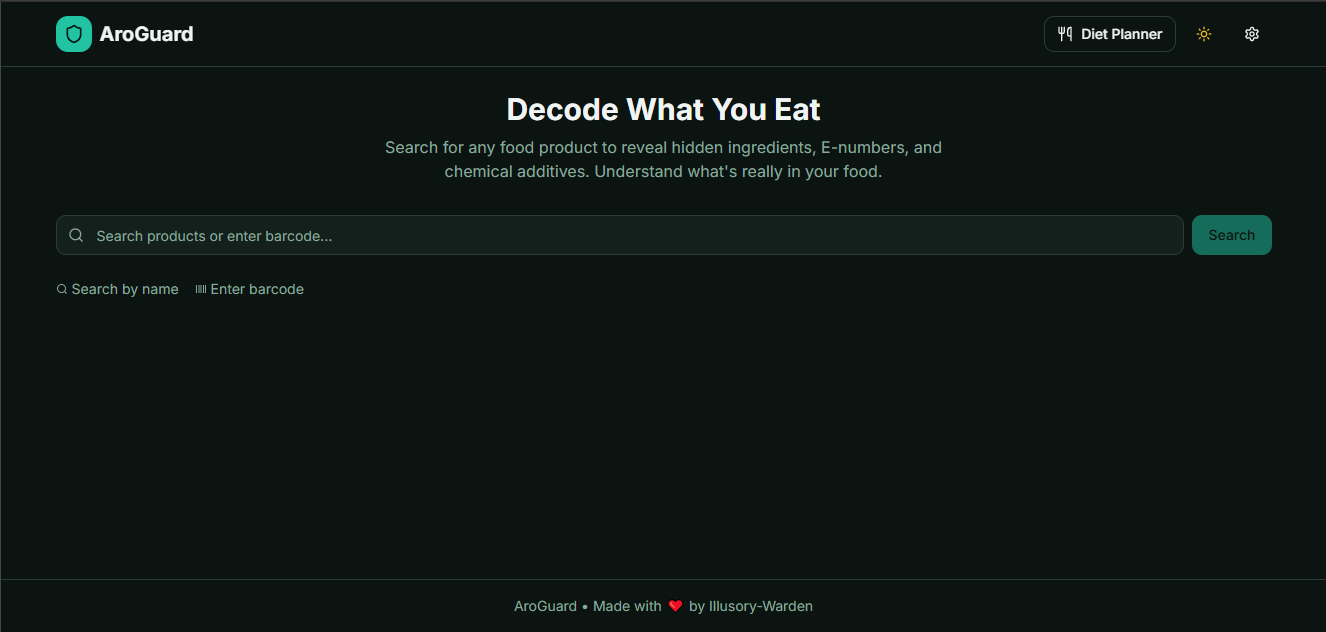
AroGuard is a comprehensive AI-powered health companion that combines two powerful features: an intelligent food ingredient decoder and a sophisticated diet planner with nutrition tracking. The application helps users make informed decisions about food products by decoding complex ingredient lists, E-numbers, and preservatives, while also providing AI-powered nutrition estimation and meal planning capabilities.
Built with modern web technologies and powered by dual AI systems (Groq and Perplexity), AroGuard delivers instant ingredient analysis, real-time nutrition tracking with support for Indian cuisine, and intelligent dietary insights. The application features an offline-first architecture with IndexedDB storage, ensuring your data is always accessible without requiring cloud synchronization or user accounts.
Key Features & Achievements
Ingredient Analysis System
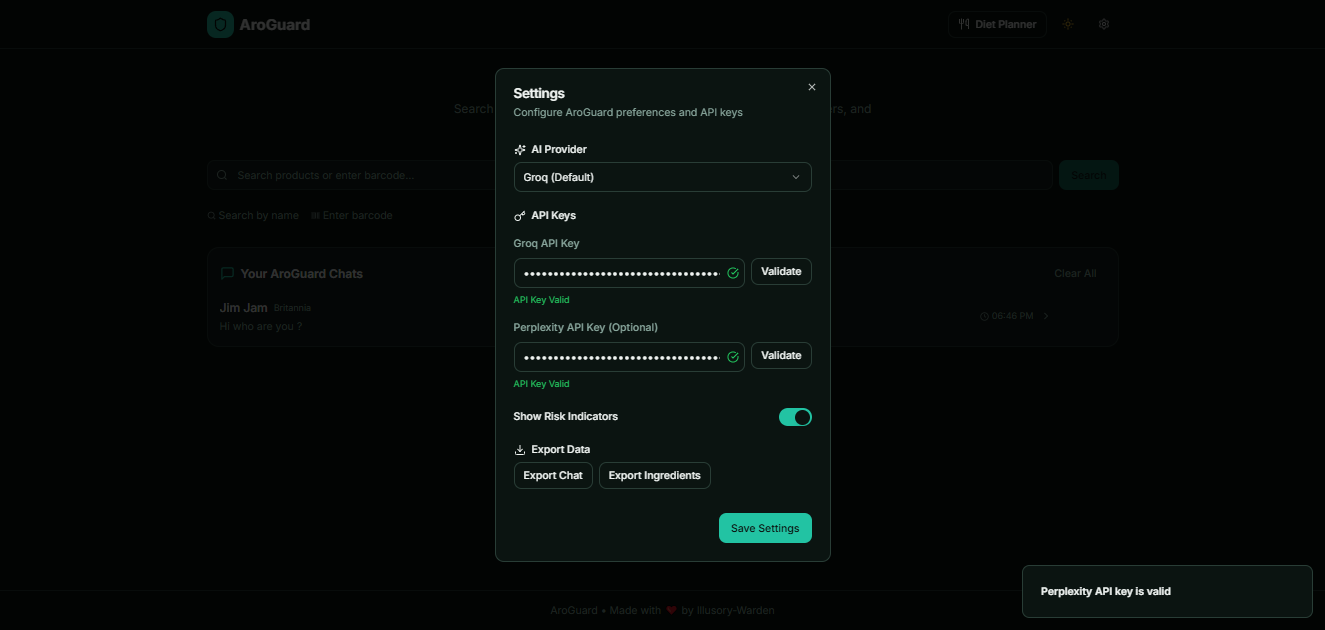
- Dual AI Integration: Groq AI for fast processing and Perplexity AI for advanced analysis with automatic API key validation
- Smart Product Search: Search by product name or barcode using Open Food Facts API with AI-powered fallback scraping
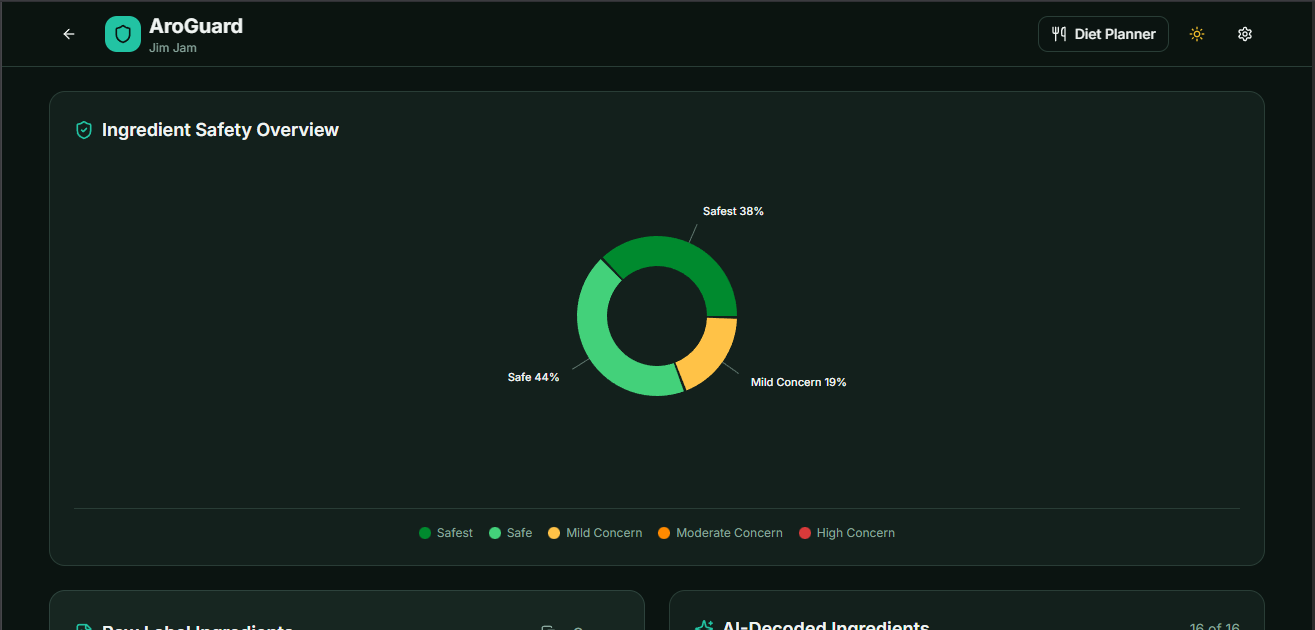
- Real-Time Safety Classification: Five-tier categorization (Safest, Safe, Mild Concern, Moderate Concern, High Concern)
- Interactive Visualizations: Dynamic pie charts with color-coded safety distribution and responsive design
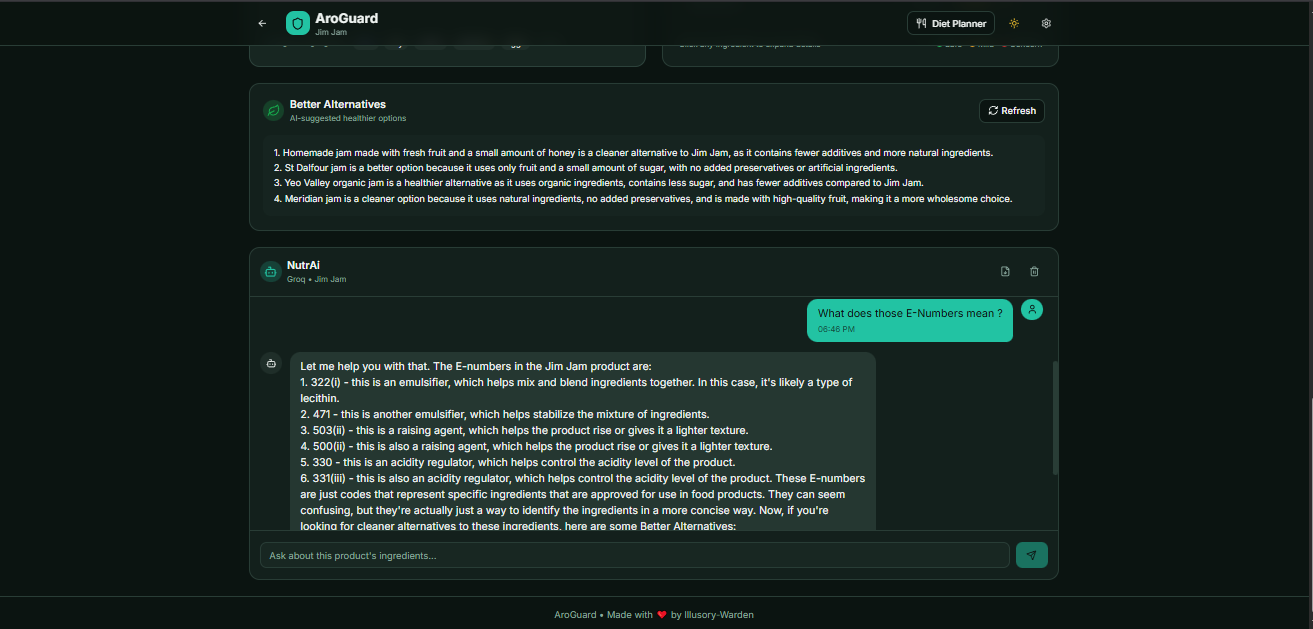
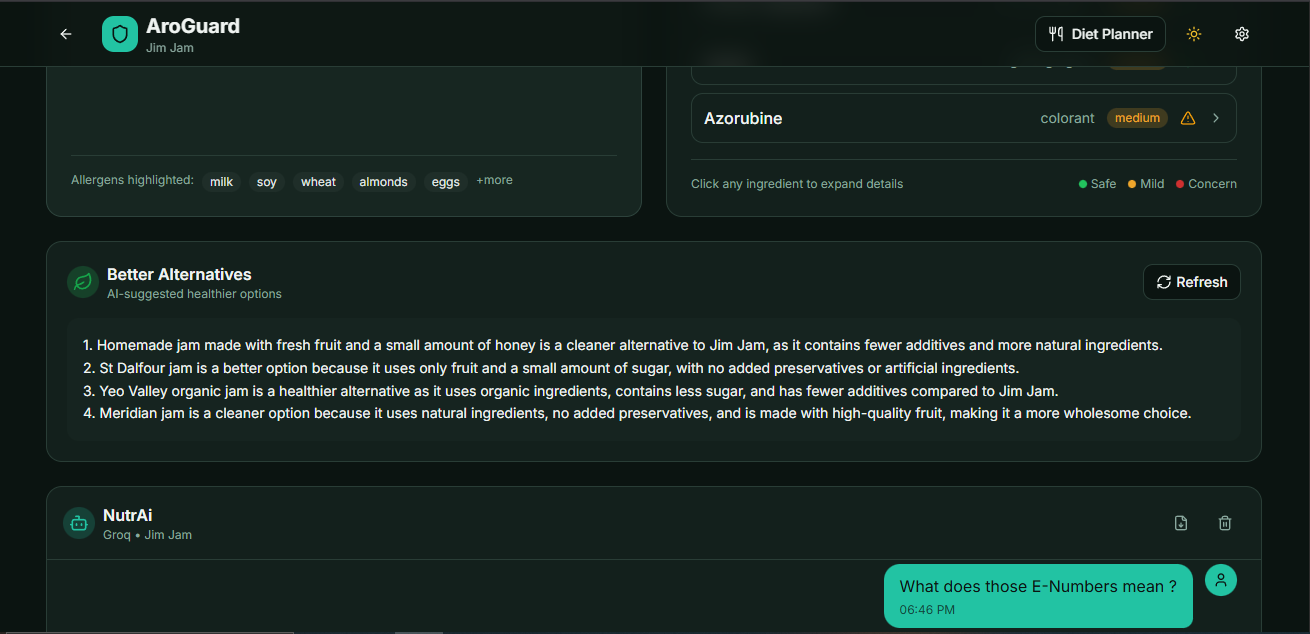
- Better Alternatives: AI-generated recommendations for healthier product choices
- NutrAi Chat Assistant: Intelligent chatbot for ingredient-related questions with plain text output
- Chat History Management: ChatGPT-like conversation history with rename, delete, and search capabilities
- PDF Export: Export chat conversations as formatted PDFs with product information and timestamps
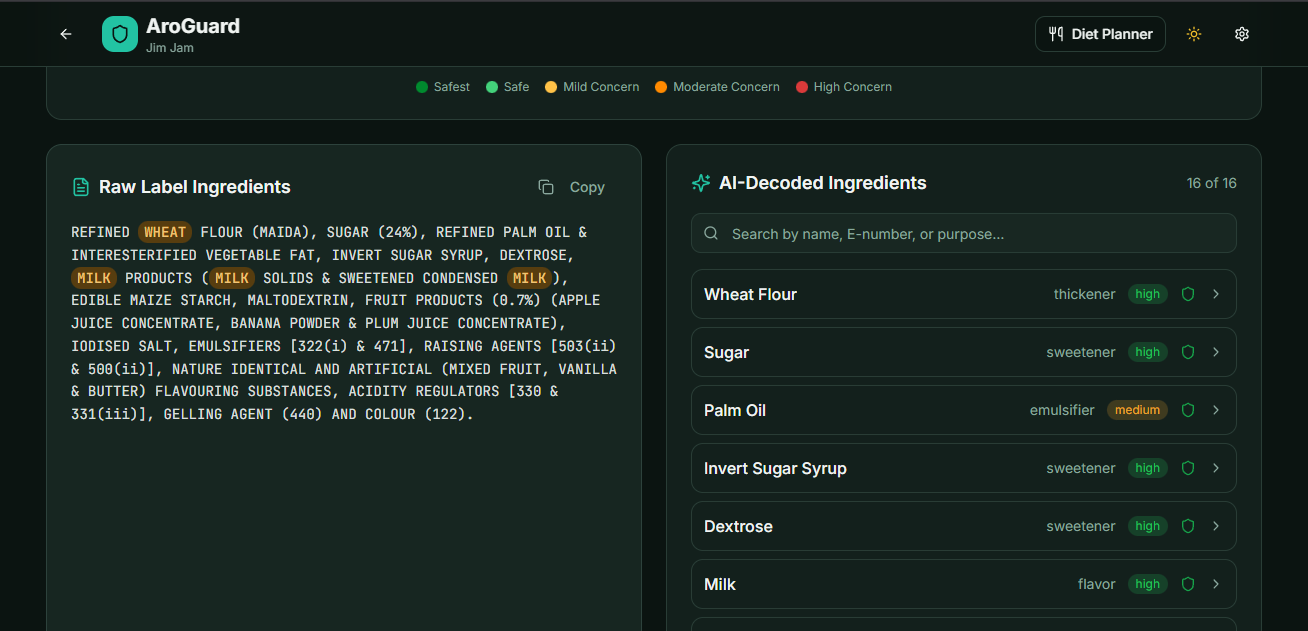
- Allergen Detection: Automatic highlighting of common allergens in ingredient lists
Diet Planner & Nutrition Tracker
- AI Nutrition Estimation: Intelligent calorie, macro, and micronutrient calculation using Groq or Perplexity
- Indian Food Support: Comprehensive understanding of Indian dishes (Dal, Paneer, Roti, Sabzi, Idli, Dosa, etc.)
- Flexible Meal Management: Support for Breakfast, Lunch, Dinner, Snacks, Pre/Post-workout, and custom meals
- Advanced Nutrition Tracking: Monitors 15+ nutrients including vitamins (A, C, D, B12), minerals (Iron, Calcium, Magnesium), and amino acids
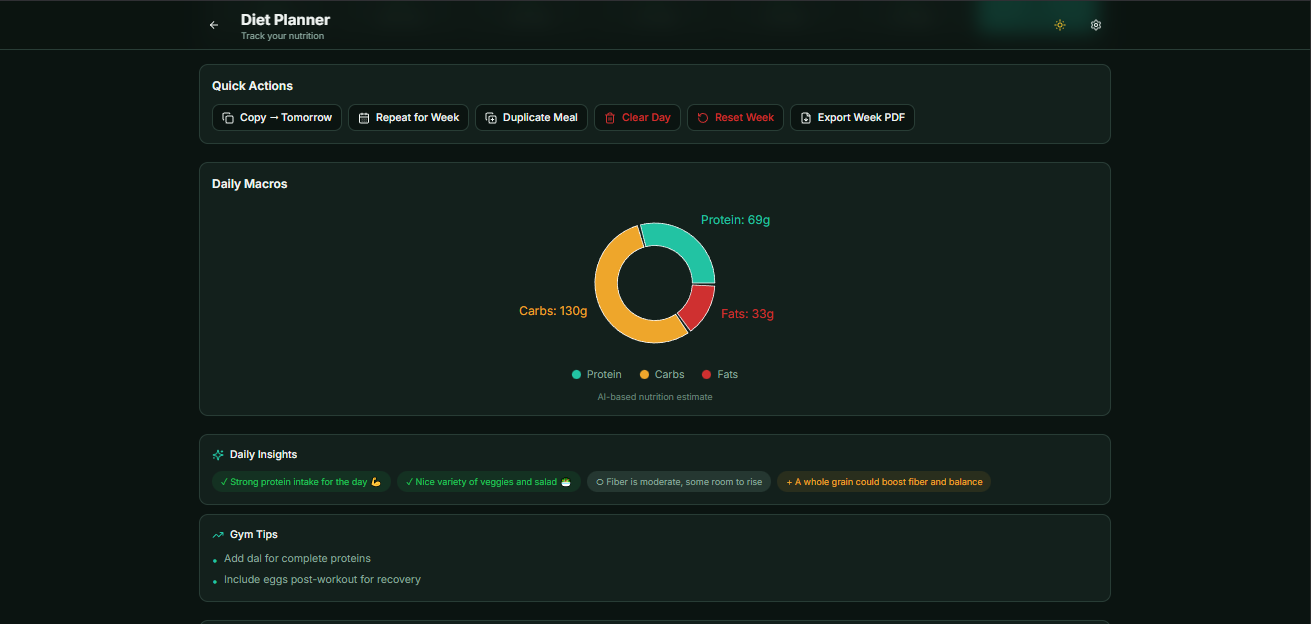
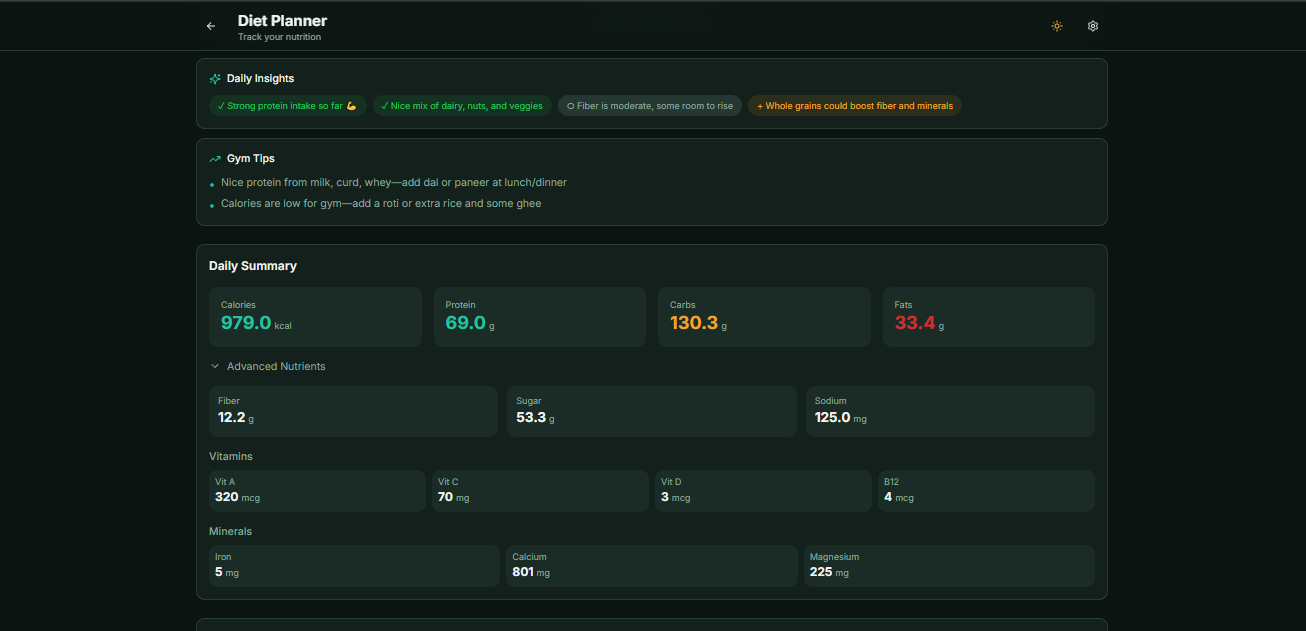
- Smart Nutrition Insights: AI-powered daily hints detecting missing nutrients with gym-focused suggestions
- Automatic Recalculation: Editing food name, quantity, or unit triggers instant nutrition updates
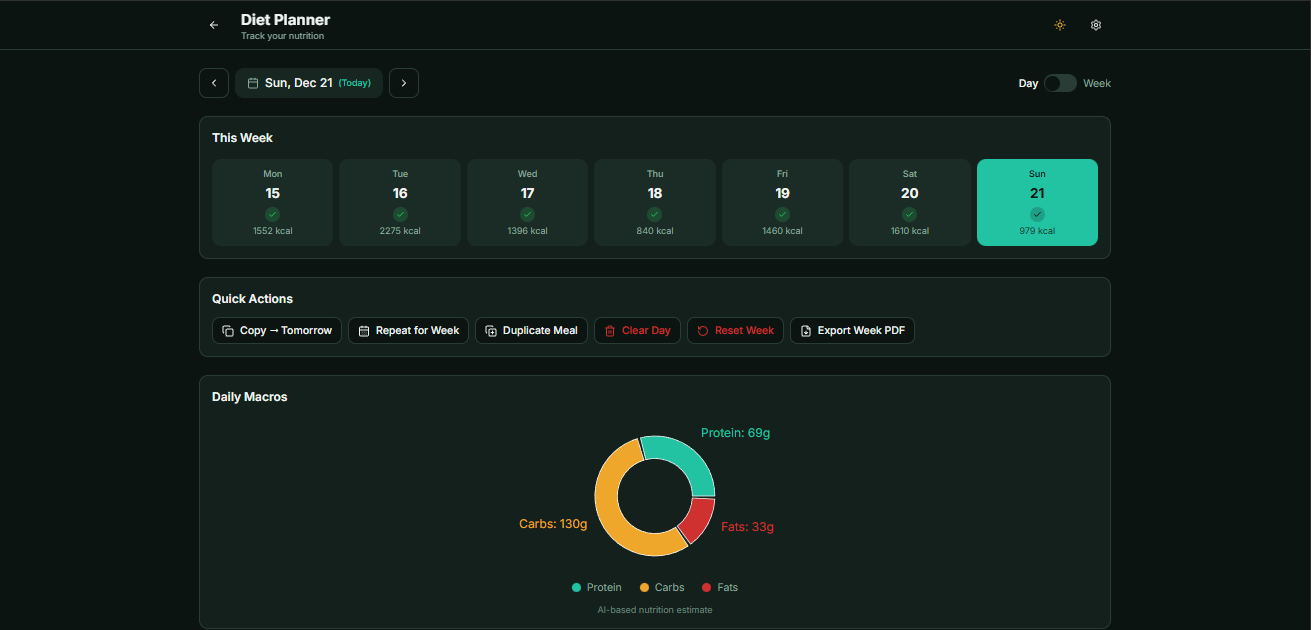
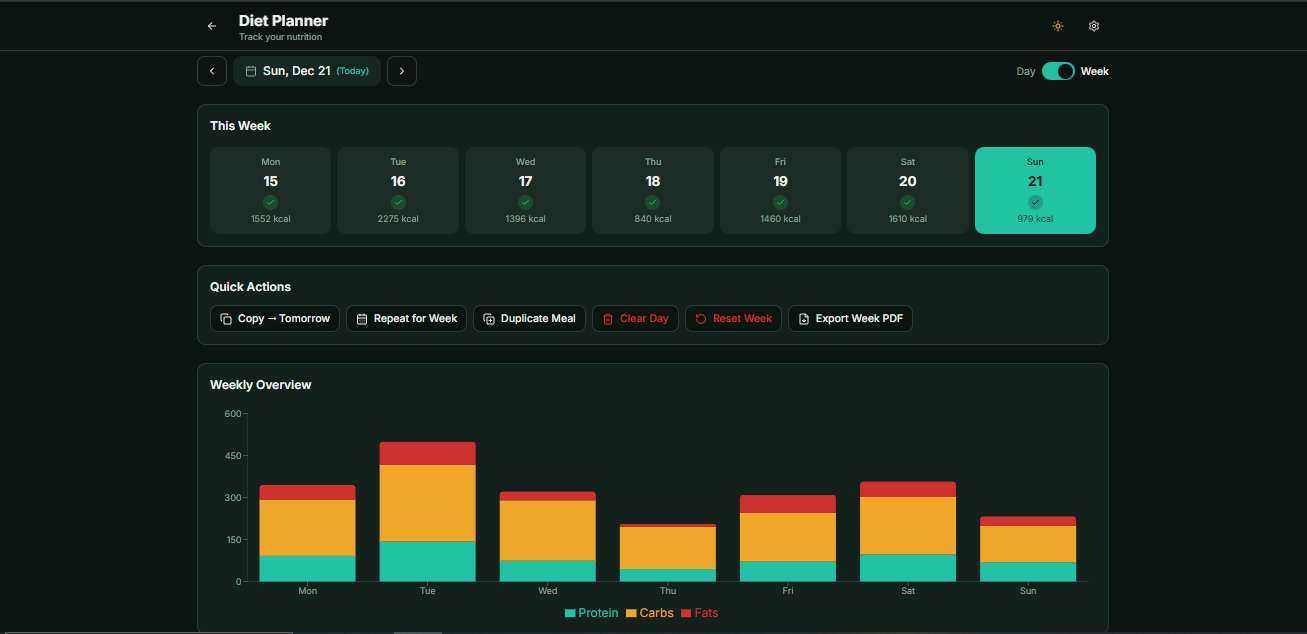
- Dynamic Charts: Toggle between Day (pie chart) and Week (stacked bar chart) views with centered legends
- Weekly Calendar: Visual overview with daily totals and quick navigation
- Quick Actions: Copy Today → Tomorrow, Repeat for Week, Clear Day, Reset Week, Duplicate Meals
- Weekly PDF Export: Download complete weekly diet reports with daily breakdowns and macro totals
- Quick Move: Move food items between meals with one-click popover interface
- Offline-First Storage: All data stored locally in IndexedDB—no accounts or cloud sync required
Technical Architecture
- React 18 with TypeScript for type-safe component development
- Tailwind CSS for responsive utility-first styling
- shadcn/ui component library for consistent UI elements
- Recharts library for interactive data visualizations
- Modular component architecture with separation of concerns
- Custom hooks for state management and data fetching
- Groq AI (llama-3.3-70b-versatile) for fast ingredient parsing and nutrition estimation
- Perplexity AI (sonar-pro) for advanced analysis and nutrition insights
- Automatic API key validation with real-time feedback (✓ green checkmark or ✗ red X)
- Smart fallback: Automatically switches to Groq if Perplexity credits are exhausted
- Model selection rules based on API key availability and validity
- Context-aware prompts for accurate ingredient classification
- Open Food Facts API for comprehensive product database (search and barcode endpoints)
- AI-powered web scraping as fallback when OFF data is missing or incomplete
- IndexedDB with multiple stores for offline-first functionality
- Separate databases: aroguard_db (main) and aroguard_diet_db (diet planner)
- Real-time data synchronization and automatic cache management
- No cloud storage—all data stays on device for privacy
- AI-powered estimation for calories, protein, carbs, fats, fiber, sugar, sodium
- Micronutrient tracking: Vitamins A, C, D, B12
- Mineral tracking: Iron, Calcium, Magnesium
- Amino acid summaries for protein quality assessment
- Support for multiple units: grams, ml, pieces, scoop, cup, tbsp
- Intelligent understanding of portion sizes for Indian cuisine
Core Features Breakdown
- Comprehensive E-number database with detailed health explanations
- Preservative identification (E200-E299) with safety information
- Additive classification: colorants, sweeteners, stabilizers, emulsifiers
- Natural vs synthetic ingredient differentiation
- Chemical name simplification for consumer understanding
- Raw ingredient display with allergen highlighting
- Safest (#008A2E): Generally recognized as safe with no known health concerns
- Safe (#43D17A): Safe for most people with minimal processing
- Mild Concern (#FFC247): May cause reactions in sensitive individuals
- Moderate Concern (#FF8A00): Limited consumption recommended
- High Concern (#D93A3A): Potential health risks or regulatory concerns
- Visual pie chart with percentage distribution and responsive design
- AI-generated suggestions for 2-4 healthier product alternatives
- Explains why each alternative is better (fewer additives, natural ingredients)
- No medical claims—focuses on ingredient quality
- Displayed between safety chart and chat interface
- Uses currently selected AI provider (Groq or Perplexity)
- Product-specific ingredient expert that only answers about current product
- Plain text output (no markdown formatting for cleaner display)
- Explains E-numbers, chemical names, and potential health effects
- Never provides medical or legal advice
- References actual parsed ingredient data from analysis
- Can suggest better alternatives when asked
- Uses currently selected model (Groq or Perplexity)
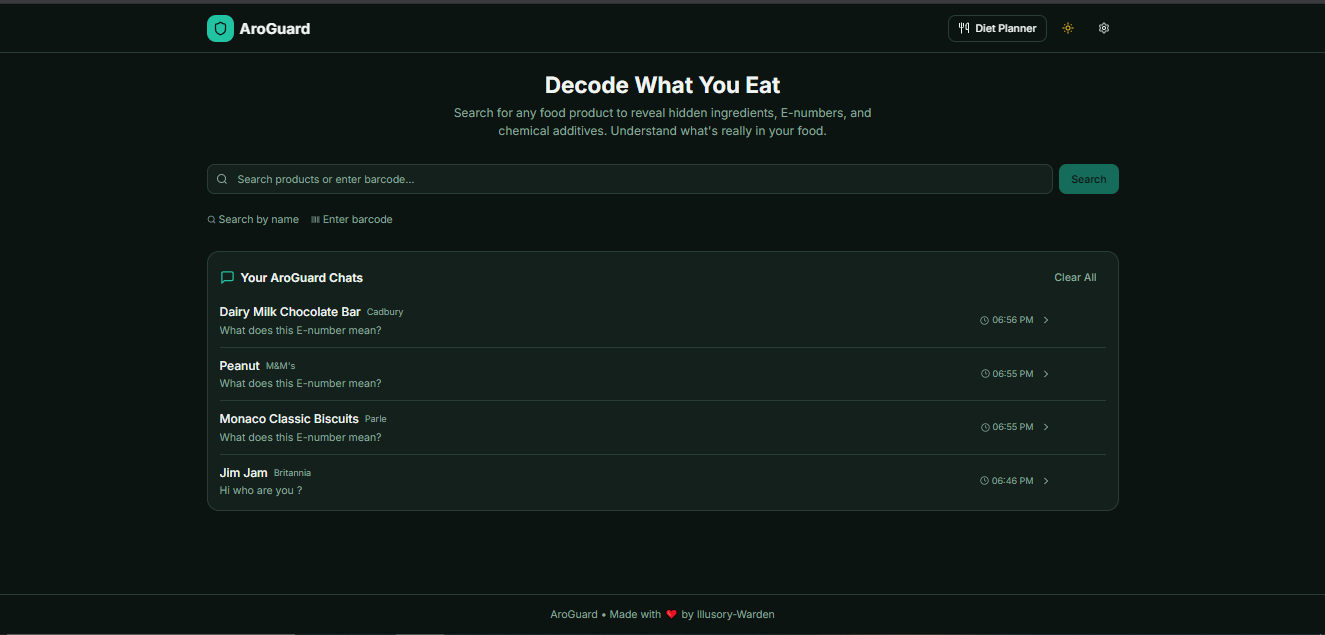
- ChatGPT-like conversation history on homepage
- Shows recent conversations below search bar
- Displays product name, timestamp, and first message preview
- Click to reopen and continue conversations
- Rename chats for better organization
- Delete individual chats or clear all at once
- Stored persistently in IndexedDB conversations store
Diet Planner Features
- Add foods by name with quantity and flexible units
- Supported units: grams, ml, pieces, scoop, cup, tbsp
- Meal categories: Breakfast, Lunch, Dinner, Snacks, Pre-workout, Post-workout, Custom
- Edit food entries with automatic nutrition recalculation
- Delete individual items or clear entire meals
- Quick Move feature: Move items between meals via one-click popover
- Duplicate selected meal to next day
- Core macros: Calories, Protein, Carbohydrates, Fats
- Additional nutrients: Fiber, Sugar, Sodium
- Vitamins: A, C, D, B12
- Minerals: Iron, Calcium, Magnesium
- Amino acid profile summaries
- Confidence indicator: Subtle "AI-based nutrition estimate" label
- Automatic recalculation when food name, quantity, or unit changes
- Understands traditional Indian dishes: Dal, Paneer Tikka, Roti, Sabzi
- South Indian cuisine: Idli, Dosa, Vada, Sambar, Upma
- Snacks: Samosa, Pakora, Bhaji, Kachori
- Sweets: Gulab Jamun, Jalebi, Barfi, Ladoo
- Regional variations recognized for accurate nutrition
- Portion size intelligence for typical Indian servings
- AI-powered daily nutrition hints analyzing complete day intake
- Missing nutrient detection with specific food recommendations
- Positive feedback on good dietary choices
- Gym-focused suggestions for muscle recovery and protein quality
- Considers both macros and micros for comprehensive advice
- Updates dynamically as you add or modify foods
- Toggle between Day View (pie chart) and Week View (stacked bar chart)
- Centered legends for better readability
- Color-coded nutrients with consistent theme support
- Daily nutrition summary cards with macro breakdowns
- Weekly calendar with daily total display
- Visual progress tracking across the week
- Copy Today → Tomorrow: Duplicate entire day's meals to next day
- Repeat Today for Whole Week: Apply today's plan to all remaining days
- Clear Day: Remove all meals for selected date
- Reset Week: Clear all data for current week
- Duplicate Selected Meal: Copy specific meal to next day
- Export Weekly Diet as PDF: Download complete report with breakdowns
Technical Challenges & Solutions
Managing two different AI providers (Groq and Perplexity) with different rate limits, credit systems, and response formats while ensuring seamless user experience. Users shouldn't face errors when Perplexity credits run out.
Solution: Implemented comprehensive API key validation system with real-time feedback (green checkmarks for valid, red X for invalid). Created smart fallback logic: if Perplexity returns 402 (credits exhausted), automatically switch to Groq. Model selection rules dynamically adjust based on API key availability—if Perplexity key missing or invalid, only Groq is offered.
Open Food Facts database is community-driven and often incomplete. Many products lack ingredient text, making it impossible to perform analysis. Simply showing "no data" would significantly limit the app's usefulness.
Solution: Designed a robust fallback pipeline: (1) Query Open Food Facts for ingredients_text, (2) If missing/empty/null → trigger Groq scraping, (3) AI extracts ingredients from product HTML/description, (4) Return as JSON with error handling. This ensures comprehensive coverage while prioritizing official data when available.
Standard nutrition databases don't accurately capture Indian cuisine, which has diverse regional variations and cooking methods. Generic "Dal" estimation wouldn't account for Dal Tadka vs Dal Makhani differences.
Solution: Leveraged Groq and Perplexity's advanced language understanding to create context-aware nutrition estimation. AI considers cooking methods, regional variations, and typical portion sizes. Trained on diverse Indian food descriptions to understand nuances like "1 roti" vs "1 paratha" or "Dal Fry" vs "Dal Makhani." Provides amino acid summaries for protein quality assessment.
When users edit food entries (changing quantity from 100g to 150g or unit from "pieces" to "cups"), nutrition values become outdated. Requiring manual recalculation would create poor UX, but automatic API calls could be expensive.
Solution: Implemented smart change detection that triggers recalculation only when name, quantity, or unit changes—not on every keystroke. Uses efficient API calls to re-estimate nutrition and updates IndexedDB immediately. User sees updated values instantly with minimal API usage. Maintains confidence indicator showing data is "AI-based estimate."
Diet Planner requires managing daily logs (keyed by date), custom meals, chat history, parsed ingredients, and settings across two separate IndexedDB databases. Ensuring data consistency and avoiding race conditions was critical.
Solution: Created separate databases: aroguard_db (conversations, parsedIngredients, settings) and aroguard_diet_db (dayLogs, customMeals). Used promise-based IndexedDB wrappers with proper error handling. Implemented atomic operations for Quick Actions (Copy Today → Tomorrow, Repeat for Week) to prevent partial updates. Weekly PDF export aggregates data efficiently across multiple dates.
AI models like GPT and Claude naturally produce markdown formatting (\*, \*\*, bullets) which creates rendering issues and visual noise. NutrAi chat needed clean, readable text without stray characters.
Solution: Implemented textUtils.ts with sanitization functions that strip markdown while preserving structure. Explicitly instructs AI in system prompts to use plain text only with simple numbering (1. 2. 3.) for lists. Created specialized prompt engineering to ensure both Groq and Perplexity output clean text consistently.
Real-World Impact & Use Cases
Ingredient Analysis Use Cases
- Health-Conscious Consumers: Make informed decisions about processed foods and avoid harmful additives
- Allergy Management: Critical tool for identifying dangerous ingredients quickly
- Parents: Check children's snacks for harmful preservatives and E-numbers
- Dietary Restrictions: Support vegan, vegetarian, and religious dietary requirements
- Nutritional Education: Learn about common additives and health effects
- Shopping Assistant: In-store product evaluation via barcode scanning
Diet Planner Use Cases
- Fitness Enthusiasts: Track macros and protein for muscle building with gym-focused AI suggestions
- Weight Management: Monitor daily calorie intake and maintain consistent eating patterns
- Micronutrient Tracking: Ensure adequate vitamin and mineral intake for overall health
- Indian Cuisine Tracking: Accurately log traditional meals without generic database limitations
- Meal Planning: Use Quick Actions to plan entire weeks efficiently
- Health Reports: Export weekly PDFs for sharing with nutritionists or personal tracking
- No-Account Privacy: All data stays on device—perfect for privacy-conscious users
Technical Implementation Details
- Functional components with React Hooks (useState, useEffect, useContext)
- Custom hooks for API calls (useGroqApi, usePerplexityApi)
- Type-safe props and state with TypeScript interfaces and types
- Error boundaries for graceful error handling
- Component structure: /components/diet, /lib, /pages
- Strict type definitions in dietTypes.ts and types.ts
- groqApi.ts: Ingredient parsing, nutrition estimation, chat responses
- perplexityApi.ts: Advanced analysis, nutrition insights, alternative recommendations
- nutritionAi.ts: Unified nutrition estimation interface with Indian food support
- API key validation endpoints with real-time feedback
- Structured prompt engineering for accurate classifications
- Response parsing with JSON validation
- Automatic credit exhaustion detection and fallback
- offApi.ts: Text search and barcode search endpoints
- Fresh data fetching for every query (no stale results)
- Product grid resets on each search
- AI scraping fallback when ingredients_text is missing
- Handles empty results gracefully with "No products found"
- db.ts: Main database (conversations, parsedIngredients, settings)
- dietDb.ts: Diet database (dayLogs, customMeals)
- Promise-based operations with proper error handling
- Date-keyed storage (YYYY-MM-DD) for efficient daily log access
- Atomic operations for Quick Actions to prevent data corruption
- No cloud sync—complete offline functionality
- Utility-first CSS for rapid UI development
- Responsive design with mobile-first methodology
- Custom color schemes for safety classifications
- Dark mode support with theme persistence
- shadcn/ui components: Alert, Dialog, Card, Button, Popover
- Consistent design system across Ingredient Analysis and Diet Planner
- Pie chart for ingredient safety distribution
- Pie chart for daily nutrition macros
- Stacked bar chart for weekly nutrition overview
- Centered legends for better readability
- Responsive sizing for all screen sizes
- Color-coded categories with theme support
- pdfExport.ts: Chat conversation export with formatting
- dietPdfExport.ts: Weekly diet report generation
- Client-side generation (no server required)
- Includes product names, timestamps, and full conversation history
- Weekly reports show daily breakdowns and macro totals
- AroGuard branding footer
Technologies & Tools Used
- Frontend Framework: React 18 with TypeScript
- Styling: Tailwind CSS with utility-first approach
- UI Components: shadcn/ui for consistent design system
- AI Integration: Groq AI (llama-3.3-70b-versatile) and Perplexity AI (sonar-pro)
- Data Visualization: Recharts for interactive pie and bar charts
- External APIs: Open Food Facts API for product database
- Local Storage: IndexedDB for offline-first data persistence
- PDF Generation: jsPDF for client-side PDF export
- Build Tools: Vite for fast development and optimized builds
- Version Control: Git/GitHub for code management
- Deployment: Vercel/Netlify for static site hosting
Project Structure
- /components: Reusable UI components for Ingredient Analysis
- /components/diet: Diet Planner specific components (DateSelector, FoodInputForm, MealsList, NutritionChart, NutritionSummary, NutritionInsights, WeeklyView, QuickActions)
- /lib: Utility functions and API integrations (db.ts, dietDb.ts, groqApi.ts, perplexityApi.ts, nutritionAi.ts, offApi.ts, pdfExport.ts, dietPdfExport.ts)
- /pages: Main page routes (Index.tsx, DietPlanner.tsx, NotFound.tsx)
- /types: TypeScript definitions (types.ts, dietTypes.ts)
- aroguard_db: Main database
- • conversations: Chat history with productId, messages, timestamps
- • parsedIngredients: Cached ingredient analysis results
- • settings: App preferences and API keys
- aroguard_diet_db: Diet Planner database
- • dayLogs: Daily food entries keyed by date (YYYY-MM-DD)
- • customMeals: User-defined meal types
API Workflow & Integration
- 1. User selects a product
- 2. Attempt to get ingredients_text from Open Food Facts
- 3. If missing/empty/null → Trigger Groq fallback scraping
- 4. Display raw ingredients in left panel
- 5. Parse ingredients with AI (Groq or Perplexity)
- 6. Display decoded ingredients in right panel
- 7. Generate safety pie chart with 5 categories
- 8. Show Better Alternatives panel
- 9. Enable NutrAi chat for product-specific questions
- If Perplexity key missing → Only use Groq
- If Perplexity key invalid → Disable Perplexity, show error
- If Perplexity key valid → Allow switching between Groq & Perplexity
- If Perplexity credits exhausted (402) → Automatically fallback to Groq
- Both ingredient parsing AND NutrAi chat use currently selected model
- Groq: Test request to chat/completions with llama-3.3-70b-versatile
- Perplexity: Test request to chat/completions with sonar-pro
- 200 response = valid (✓ green checkmark)
- 401/403 response = invalid (✗ red X with error message)
- 402 for Perplexity = credits exhausted
- Spinner shown while validating
- Error messages displayed below input field
Future Enhancements
Ingredient Analysis Enhancements
- Mobile app development for iOS and Android with native camera integration
- User accounts with personalized allergen profiles and preferences
- Community ratings and reviews for products
- Real-time barcode scanning using device camera (instead of manual input)
- Comparison feature for side-by-side product analysis
- Multi-language support for global accessibility
- Offline AI models for complete offline functionality
Diet Planner Enhancements
- Cloud sync with user accounts for cross-device access
- Recipe builder with ingredient-level nutrition tracking
- Integration with fitness tracking apps (Apple Health, Google Fit)
- Meal recommendations based on nutritional goals
- Restaurant menu nutrition estimation
- Food photo recognition with automatic logging
- Social features: Share meal plans with friends or nutritionists
- Advanced analytics: Monthly trends, nutrient deficiency alerts
- Custom nutrition goals: Keto, low-carb, high-protein presets
Error Handling & User Feedback
AroGuard implements comprehensive error handling with friendly user messages:
- Invalid API keys: Real-time validation with clear error messages
- No product found: "No products found" message with search suggestions
- Scraping failed: Graceful fallback with alternative data sources
- Perplexity credits exhausted: Automatic switch to Groq with notification
- Network failures: Offline mode with cached data
- General errors: User-friendly error messages without technical jargon
- API rate limits: Throttling and retry logic with user notifications